

Passbook: Architecting a Zero-Cost Serverless Kids Allowance Tracker and Delegating the Build to AI Agents
I decided to start giving my ten-year-old daughter a monthly allowance. The condition I set was that it had to be accountable - money she could spend on whatever she liked, but in a way that taught her to operate inside a budget, to build a savings habit, and to actually see where her money went. A jar of coins does the first part. It does almost nothing for the rest.
So I did what someone with access to AI does these days - turned it into a system. This post is my notes from building Passbook - a serverless allowance tracker that lives at the boundary between “a kid’s piggy bank” and “the banking app I use every day.” It is a small application by line count, but it touches almost everything I find interesting about building software: breaking down the problem into constraints, picking an architecture that fits the platform rather than fighting it, and - the part that makes this post a little different from my regular build notes - handing most of the implementation to AI coding agents while keeping a firm hand on the wheel.
NOTE: This article is as much about how the thing got built as what it does. I owned the architecture, the technology choices, and the constraints; AI agents did the overwhelming majority of the actual typing. I’ve tried to keep the line between the two honest. There are for sure parts that are less tidy than I’d like.
What I was actually optimizing for
Like a good vibecoder, I wrote down teh constraints arounf what I was really trying to achieve. That is a big part of building systems with AI. Features fall out of constraints; I have noticed that the reverse is rarely true. These are the ones that shaped everything that followed:
- It has to teach, not just track. A running balance, a monthly budget that tops up automatically, a visible distinction between “money I have” and “money I’ve saved up from before.” Overspending should be impossible for the kids’ instance - you cannot spend money you don’t have - because the whole point is learning to live inside a number.
- It has to feel like a real bank app, not a toy. Children are not fooled by clip-art and Comic Sans. If it looks like a kid’s game, it gets treated like one. I wanted the thing to look like the neo-bank apps adults use (-ish) - clean, a big confident balance, a tidy list of transactions - so that the habit it builds transfers to the real thing later.
- It has to be trust-based. This is not a bank. There’s no real money in it, no card, no link to an actual account. It’s a shared ledger between a parent and a child, protected by a PIN. The security model needs to be genuinely solid (it’s on the public internet), but the trust model is human: I top up her allowance, she records what she buys, and we look at it together. We share the same login to keep it simple. for anything advanced, I can always go directly into the backend and edit the database.
- It must cost me effectively nothing to run, forever. A side project that costs $15/month is a side project I will eventually kill. I wanted idle cost to round to zero, so there’s never a reason to turn it off. This is a central premise to a lot of what I build.
- It must be easy for someone else to stand up. I wanted the ned result to be an opensource project that is easy for anyone to deploy if someone else wants one for their own kid, they should be able to fork it, run one script, and have their own isolated instance without editing my account IDs out of a dozen files or haivng to meddle with endless AWS permissions.
- There should be parent-side tooling. Admin chores - creating a month, fixing a fat-fingered entry, repairing the books - should be doable from my laptop without clicking around a console. This is also to keep complexity out of the app, without sacrificing features.
- Platform agnostic front-end I am a big fan of PWAs for projects like this. They run anywhere, and I can build it with nothing but HTML, CSS, and JavaScript - no build step, no framework, no runtime to maintain. It also lets me layer in a service worker for offline support, which is a nice-to-have for a dashboard.
NOTE: My first attempt at this was not the architecture you’re about to read. Late in 2025 I took a stab at it as a React Native Web app, got a login screen and a dashboard working, and then walked away from it. It was the wrong tool for the constraints above - a build pipeline and a framework runtime I’d have to babysit, for an app that is fundamentally a few forms over a ledger. I scrapped it and restarted from the constraints.
The architecture I drew first
The single most important constraint I Set was zero idle cost . This almost picks the architecture for us. Anything with an always-on server loses. That points hard at two ideas working together: a static front-end served for free, and a serverless back-end that only bills when it actually runs.
Static hosting is the easy half. GitHub Pages has been my go to for years and will serve a folder of HTML, CSS, and JavaScript over HTTPS, on a custom path, for free. That is the same approach taht I have for prettymuch all my web-apps including this blog. The interesting half is the back-end. I settled on a small Go function behind an HTTP API, talking to a NoSQL table billed per-request. When nobody is using the app - which, for a single family, ten-year-old’s allowance, is most of the time - every component bills exactly zero.
Here is the whole system on one screen:
landing page"] K["/passbook/kids/
PWA"] end K -- "HTTPS · X-Session-Token" --> AG["API Gateway
HTTP API v2"] AG -- "AWS_PROXY" --> LAM["Lambda
Go · arm64 · 256 MB"] LAM -- "single-table" --> DDB[("DynamoDB
on-demand")]
A request from the browser hits API Gateway, which proxies it to a single Go AWS Lambda function, which reads and writes a single DynamoDB table. That’s it. No VPC, no load balancer, no container orchestration, no database server to patch. The entire stateful surface of the application is one DynamoDB table per instance.
Why these specific pieces?
I am calling these out specifically because teh default suggestions that AI suggested were suboptimal for the constraints, and I had to steer the agents away from them. The architecture is not novel - it’s the one that fits the constraints - but it is deliberate in a way that a naive “best practices” design wouldn’t be.
- Go on Lambda, ARM64, custom runtime. Go compiles to a single static binary with tiny cold starts, which matters when a function is almost always cold. ARM64 (Graviton) is cheaper per GB-second than x86 and, on this workload, no slower. I build it with
-tags lambda.norpcto drop the unused RPC path and shrink the binary. None of this is exotic; it’s just choosing the boring, cheap, fast option at every fork. - DynamoDB in on-demand (
PAY_PER_REQUEST) mode. A relational database wants to be ON . DynamoDB on-demand is the opposite: it charges per read and write unit and nothing at rest. For an access pattern this simple - and it is simple, as we’ll see - a single-table NoSQL design is both cheaper and less operational work than the smallest RDS instance, which would itself blow the zero-cost budget. - API Gateway HTTP API v2, not the older REST API - it’s cheaper, and I don’t need the REST API’s extra features. It terminates TLS, handles CORS, and gives me request throttling for free.
This is the part of the project I enjoy most, and I want to be precise about what “enjoy” means here. It isn’t the novelty - load-balanced web stacks are a solved problem, and I’ve written about one before. It’s the fit. Each constraint eliminates options until the remaining design feels inevitable. Getting to “inevitable” is the craft.
Designing within the constraints
Zero idle cost, and a budget instead of alarms
The architecture gets you most of the way to free; the configuration gets you the rest. DynamoDB is on-demand. The Lambda has no provisioned concurrency, so it bills only for invocation-milliseconds. CloudWatch log retention is capped at 14 days so logs don’t accumulate into a real bill. The Lambda’s memory is set to 256 MB - bumped up from 128 MB not for throughput but because, on ARM, the extra memory is roughly cost-neutral in GB-seconds while it roughly halves the Argon2 password-hash latency on login.
The decision I want to call out, because it went against my instinct, is monitoring. The reflex of anyone who has run production systems is to wire up CloudWatch alarms and an SNS topic. I deliberately did not. Here’s the reasoning, which is entirely shaped by the platform:
- CloudWatch’s free tier covers ten alarms. With one alarm per instance per metric, you cross that cliff and start paying - to monitor an app that costs a cent a month. The monitoring would cost more than the thing being monitored.
- An SNS email subscription that nobody confirms emails into the void.
So instead of per-resource alarms, the cost guard is a single account-level AWS Budget set to about $10, backstopped by hard technical ceilings: the HTTP API is throttled to 5 requests/second (burst 10), and the Lambda has a reserved concurrency of 5. Worst-case abuse is capped at something like $15–20/month per instance by construction, not by alerting after the fact. The right monitoring strategy for a hobby-scale serverless app is genuinely different from the right strategy for a fleet, and pretending otherwise just burns money.
NOTE: This is the recurring lesson of the whole project: a good architecture is not the one with the most safeguards, it’s the one whose safeguards fit the platform’s economics and the projects requirements. On a system that scales to zero, a spend ceiling beats a pager.
One codebase, multiple instances
post deployment, I have two of these running: kids (my daughter’s allowance) and eatout (a household eating-out budget my wife and I share). They are the same code, deployed as two completely isolated stacks. I never wanted to maintain a fork per instance, so customization lives in exactly one place: a single YAML file per instance.
config/instances/
├── kids.yaml      # monthly_amount: 100, blue theme, no overspending
└── eatout.yaml    # monthly_amount: 500, orange theme, carry-over + overspend
A kids.yaml is small and declarative:
name: kids
display_name: Kids Passbook
monthly_amount: 100
colors:
  primary: "#5B7FD9"
  primary_dark: "#4263B3"
  background: "#F5F7FB"
labels:
  total_savings: Total Savings
  add_funds_button: "+ Funds"
  expense_buy_label: What did you buy?
That one file drives three layers: the PWA manifest and theme color, the front-end’s CSS variables, and the user-facing copy. The eatout instance flips two behavioral flags - allow_overspending: true and carry_over_balance: true - and changes the labels (“Total Remaining”, “+ Top Up”, “Where did you eat?”). Same binary, same templates, entirely different app.
The deployment fans out automatically. The CI pipeline globs config/instances/*.yaml, turns it into a JSON array, and runs the deploy job as a matrix over that array. Adding a third instance is: drop a YAML file, push, done.
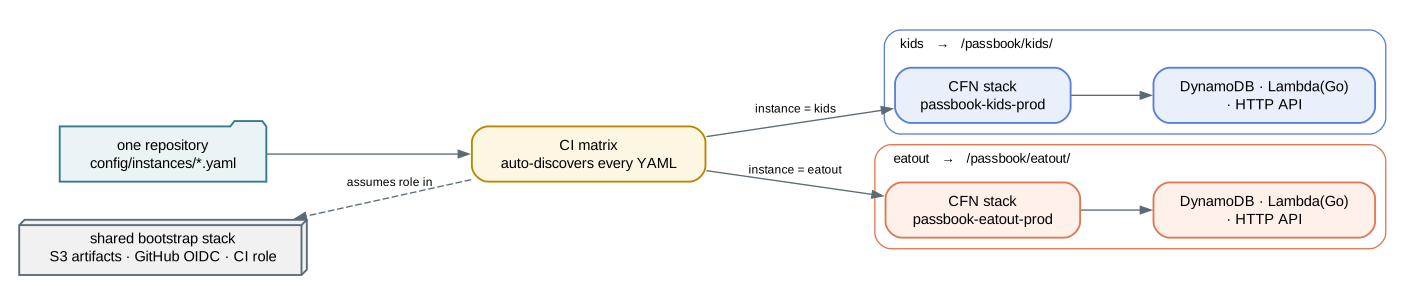
One repository fans out into N fully isolated stacks.
Each instance gets its own passbook-<name>-prod CloudFormation stack - its own table, its own function, its own API endpoint - so the blast radius of anything going wrong is exactly one instance. The only thing they share is a one-time bootstrap stack (the S3 bucket for Lambda artifacts, the GitHub OIDC provider, and the CI role) and, of course, the code.
The data model, and one microarchitectural detail
Everything for an instance lives in one DynamoDB table, keyed by a partition key (PK) and sort key (SK). This is the standard single-table pattern: different entity types share the table, distinguished by key prefixes.
| Entity | PK | SK |
|---|---|---|
| Config (PIN hash) | CONFIG |
CONFIG |
| Global balance | BALANCE |
BALANCE |
| Month summary | MONTH#<yyyy-mm> |
SUMMARY |
| Expense | MONTH#<yyyy-mm> |
EXP#<unixnano>#<id> |
| Session | SESSION#<token> |
(same) |
| Rate-limit (per IP) | RATELIMIT#<ip> |
RATELIMIT |
| Month-list mirror | MONTHLIST |
<yyyy-mm> |
Most of those rows are obvious. The one worth zooming in on because it’s the kind of decision that separates “works in a demo” from “still cheap in two years” - is MONTHLIST.
The dashboard needs to list every month, newest first, for the history view. The naive way to do that in a single-table design is a Scan with a filter. A Scan reads the entire table. On day one, with three expenses, that’s free and instant. After two years of daily/weekly entries, that Scan is reading thousands of expense rows just to find a dozen month summaries - and on a pay-per-read database, you’re now paying to re-read the child’s entire spending history every time the app opens.
So every month summary is mirrored into a single partition, PK="MONTHLIST", with the month as the sort key. Listing months becomes one Query against one partition, sorted, paginated, with cost proportional to the number of months - not the number of expenses. The mirror is kept consistent with the canonical summary by writing both in a single TransactWriteItems call, so the list can never drift from the truth.
MONTH#2026-06 / SUMMARY    ← canonical month record (mutated on every expense)
        │  (mirrored, in the same transaction)
        ▼
MONTHLIST / 2026-06        ← cheap, sorted, paginated index
This is a tiny detail in a tiny app. But the instinct is the same for hardware design and software design: model the access pattern first, then design the data layout to make the common operation cheap. Whether the substrate is a DynamoDB partition or an on-chip memory hierarchy, you’re answering the same question - what does this thing read on the hot path, and how do I make that read small? and efficient
The trust model: PIN, but done properly
“Trust-based” is a statement about the human relationship, not an excuse for weak security. The app is on the public internet under a guessable URL; the security has to be real. The login flow is a PIN, but everything around it is the same machinery I’d put on something that mattered:
A few things in that flow that I think are worth doing even on a hobby project:
- The PIN is stored as an Argon2id hash (memory-hard, 16 MB / 3 iterations), never in plaintext, and verified with a constant-time comparison.
- Rate limiting happens before the expensive hash. The failed-attempt counter is incremented with a conditional DynamoDB update (
attempts < max). That single condition closes the check-then-increment race that a naive read-modify-write would open, and it lets the server refuse a request at the cap without ever paying the Argon2 cost. Even a malformed PIN increments the counter, so you can’t use input validation as a timing oracle. - The source IP comes from the API Gateway request context, set authoritatively after the user’s own headers are copied in, so a client can’t forge the IP the rate limiter keys on.
- First-deploy takeover is closed. Because the config (including the PIN slot) is created with an
attribute_not_existscondition, an attacker who sees a freshly deployed, public instance can’t race the owner to claim the PIN.
There’s also WebAuthn biometric unlock - Touch ID / Face ID / Windows Hello - layered on top, with the credential stored server-side, and crucially, failed biometric attempts hit the same per-IP rate limiter so you can’t dodge the lockout by switching endpoints. I’ll spare you the full WebAuthn details; the point is that “trust-based” described the relationship with my daughter, and never the threat model.
A kid-facing front-end that mimics a real bank
The front-end is deliberately old-fashioned in its construction: vanilla JavaScript, vanilla CSS, no build step. No bundler, no framework, no node_modules, nothing to transpile. index.html loads a few ES modules. For an app this size, a build pipeline is pure liability - another thing to break, another thing to keep current. The constraint (“served as static files from GitHub Pages”) and the tool (“write files the browser already understands”) agree with each other.
What it produces, though, looks like this:
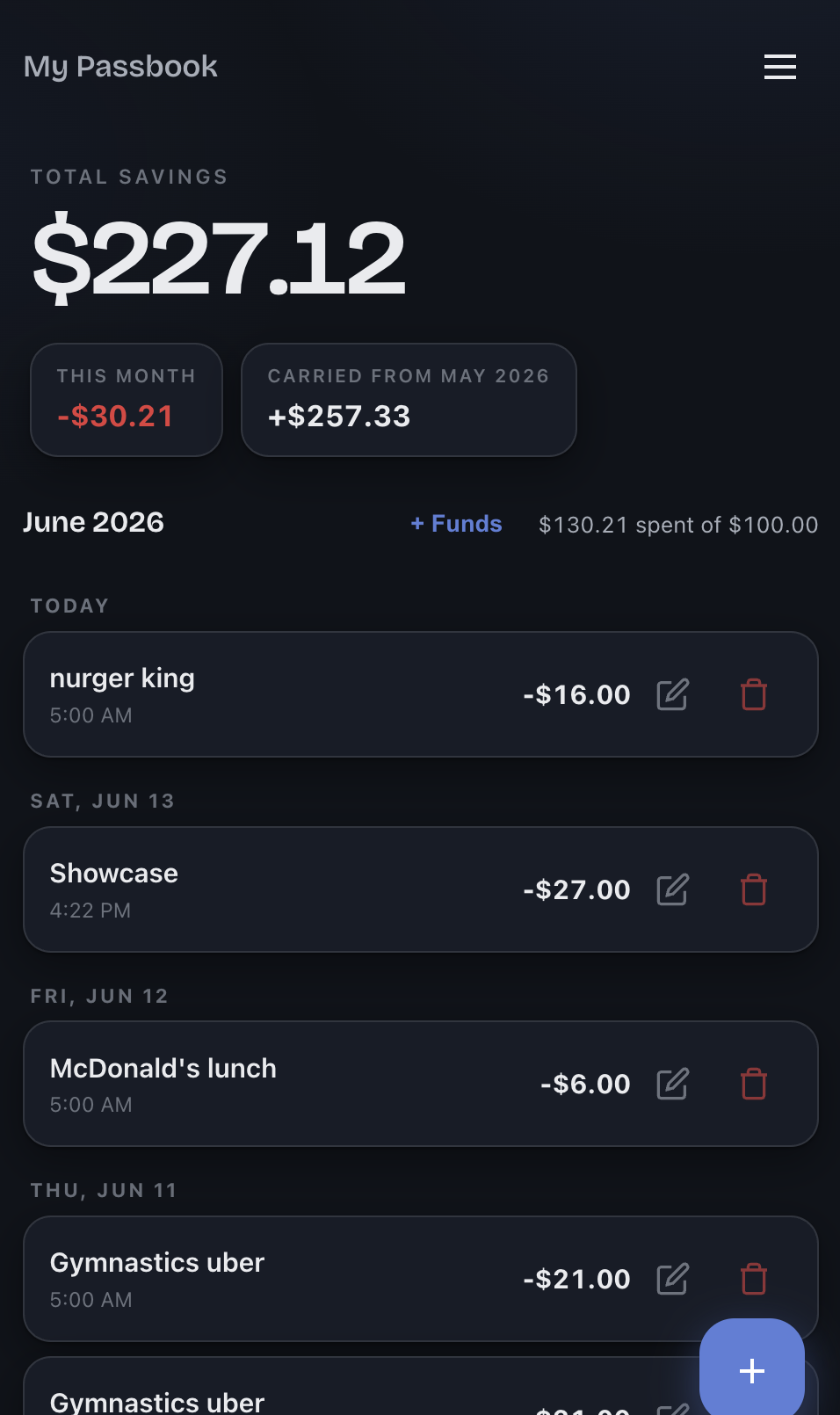
The kids dashboard.
A few of the choices behind that screen:
- A design-token theme injected at deploy time. The stylesheet defines four CSS variables - primary, primary-dark, background, and a “negative” color - with sane defaults. At deploy, CI writes a tiny
theme.cssfrom the instance’s YAML colors and links it after the main stylesheet, so the cascade wins. That’s how one CSS file becomes a blue kids’ app or an orange eat-out app with no code change. (It has to be an external stylesheet, not an inline<style>, because the Content-Security-Policy is locked tostyle-src 'self'- more on that below.) - System dark mode via
prefers-color-scheme, which intentionally ignores the instance background tint and builds its own near-black palette. - The “Carried from May” chip. When a balance carries over, the carried amount gets its own chip rather than being silently folded into the month’s number. A carried deficit stays visible and turns red, instead of hiding inside “This Month.” The child should see that last month followed her into this one.
- It’s a real PWA. A service worker caches the app shell (stale-while-revalidate) and the read-only month data (network-first, cache fallback), so the dashboard opens offline; auth endpoints and every non-GET are never cached. She can add it to her home screen and it behaves like an installed app.
I also have a small Content-Security-Policy that the deploy pipeline tightens on the way out - the committed connect-src is a wildcard over the API Gateway domain, and CI rewrites it to the exact API origin for that instance, with a build-time guard that fails the deploy if the wildcard it expects to replace isn’t there:
default-src 'none'; script-src 'self'; style-src 'self';
img-src 'self' data:; font-src 'self';
connect-src 'self' https://*.execute-api.us-west-2.amazonaws.com;
manifest-src 'self'
For the parent side, there’s no console-clicking. A set of shell scripts wraps the API for admin chores - create a month, add funds, and a fixchain command that repairs the carry-over chain if a past month’s books get edited. I’ve used that last one in anger, twice, on the live kids instance :( .
The pipeline is what makes delegation safe
Now the part that ties the project to the bigger story. I built all of this primarily by directing AI coding agents - and the thing that made that comfortable, rather than terrifying, is the deployment pipeline. CI/CD is usually framed as a productivity tool. On this project it was also a control surface: the rails that let me hand the keyboard to an agent without handing over the account.
There are three workflows:
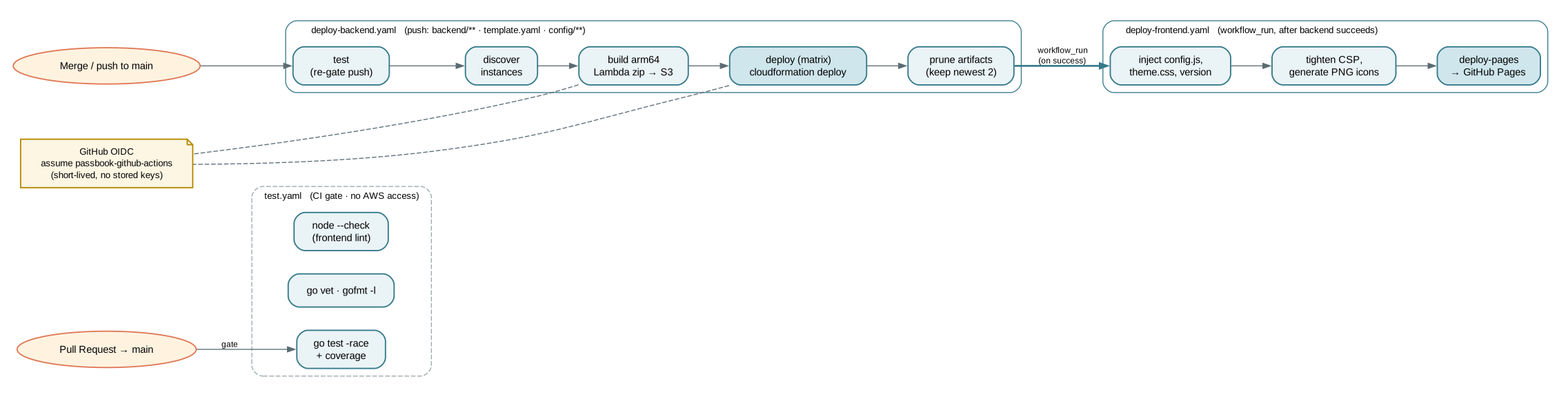
The three pipelines.
The single most important decision here is keyless AWS authentication via GitHub OIDC. There are no stored AWS access keys - not in secrets, not anywhere. GitHub Actions presents an OIDC token, and AWS hands back short-lived credentials for a role whose trust policy is pinned to this repository, in the production environment. The only secret in the whole project is the 12-digit AWS account ID.
The role used is least-privilege. Every statement is scoped to passbook-* resource ARNs. The role can manage CloudFormation stacks named passbook-*, DynamoDB tables named passbook-*, Lambdas named passbook-* - and nothing else. IAM mutations are gated behind a condition that they must be called via CloudFormation (aws:CalledVia: cloudformation.amazonaws.com), and the policy explicitly cannot attach AdministratorAccess to anything. If the credentials leaked tomorrow, the worst someone could do is vandalize the passbook stacks.
The rest of the pipeline is mundane in the good way:
test.yamlruns on every PR with no AWS access -go test -racewith coverage,go vet, a hardgofmtgate, and anode --checklint on every front-end file.deploy-backend.yamlruns on a push tomainthat touches the back-end, the template, or an instance config. It re-runs the full test gate (so a direct push to main is gated exactly like a PR), discovers instances, cross-compiles the ARM64 binary, uploads it to S3, and runscloudformation deployper instance via the matrix. Its concurrency group is set to serialize and never cancel mid-deploy to prevent stranding a stack inUPDATE_IN_PROGRESS.deploy-frontend.yamlis chained to fire after a successful back-end deploy (viaworkflow_run). It injects the per-instance config and theme, stamps the version from the latest git tag into the footer, tightens the CSP, generates the PWA icons, and publishes to Pages.
Someone forking the project runs one script (setup.sh) that deploys the bootstrap stack, stores their account ID, creates the production environment, and enables Pages. Because the deploy derives the allowed origin from the repository owner, everything else just works on their fork without editing a single file. The “easy for others to replicate” constraint turned out to be mostly a CI problem, and I solved it in CI.
The Agentic dev flow - working with an army of junior engineers
I treated the AI agents the way I’d treat a team of capable, fast, tireless, and occasionally overconfident junior engineers. I did the work I’m good at and enjoy - the architecture, the technology selection, the constraint-shaping, the reviews - and I delegated the work that is mostly typing. Concretely:
| What I owned / the part I enjoyed | What the agents did (the grunt work) |
|---|---|
| The architecture: static + serverless, single-table data model, the multi-instance model, the OIDC/least-privilege security model | The bulk of the implementation typing across Go, JavaScript, CloudFormation, and shell |
| The technology calls: Go on ARM Lambda, DynamoDB on-demand, HTTP API v2, no framework on the front-end | Translating my design into working code, wiring the handlers, the DynamoDB marshalling, the CSS |
| The constraints, the threat model, the access patterns, the cost ceiling | The boilerplate: tests, the in-memory fake repository, the workflow YAML, the icon generation |
| Reviewing every change; deciding what shipped; the carry-over and rounding semantics | Running the deploys under the scoped OIDC role; chasing down the bugs I pointed at |
| Describing the UI in prose and rough ASCII layouts, then iterating | Producing the actual HTML/CSS from those descriptions |
I want to be careful and not oversell my own role here. The written design spec in the repo, for instance, is a checked-in artifact that the agent and I produced together - I drove the decisions, but the document itself is co-authored. I didn’t hand over a finished blueprint and receive a finished app; I steered, continuously, through a lot of back-and-forth. That’s the real shape of the work, and it’s more interesting than the tidy version.
The guardrails I put around the agents were deliberate:
- Scoped credentials, as described above. The agent could deploy passbook, and only passbook.
- A test gate it could not bypass. Nothing reaches an instance without passing
go test -race,vet, andgofmt. The agents write the tests too - but the gate is the gate. - A pull-request workflow for the substantial work. The security hardening, the test consolidation, the UI redesign, the carry-over semantics - those went through numbered PRs I reviewed and merged.
War stories
The agents are fast and mostly right. “Mostly” is load-bearing. The bugs that survived to production are the ones worth telling, because every one of them is a place where the platform’s behavior surprised the obvious-looking code - which is exactly where a human architect earns their keep.
The yq truthiness trap. The deploy workflow read the carry-over flag with yq '.carry_over_balance // true'. The // operator in yq (and jq) is “alternative” - it substitutes the default when the left side is null or false. So false // true evaluates to true. An instance that explicitly set carry_over_balance: false silently deployed with carry-over on, for weeks, and the config file looked correct the whole time. The fix was to read the raw value and only default when the key is literally absent. I now distrust // on booleans on sight.
A floating-point balance written to the database. Money in JSON arrives as float64, and DynamoDB’s attribute marshaller stores float64 at full precision. A carried balance computed as -522.16 + 500 went into the table as -22.159999999999968. The fix is a roundCents helper (math.Round(v*100)/100) applied at every service boundary and absolute write - boring, classic, and exactly the sort of thing that’s obvious in hindsight and invisible in a code review at speed.
An IAM action that isn’t where you’d look for it. This one caused an actual outage. DynamoDB transactions authorize through the per-item actions (PutItem, UpdateItem, and so on), so the tests - which use an in-memory fake - were perfectly green. But BatchWriteItem is its own IAM action, not implied by those grants. The code path that used it (a bulk backfill) had never been exercised against real IAM until it ran in production and was denied. The lesson, now written in a comment next to the policy: a fake repository makes your tests fast and your IAM blind. Always diff a new SDK call against the live role policy before shipping.
CloudFormation drift from a “helpful” extra step. An early version ran aws lambda update-function-code after the CloudFormation deploy, to be sure the latest code was live. That desynced the stack’s recorded S3 key from the actually-deployed code, which quietly broke rollbacks and change-sets. The fix was to delete the “helpful” step and let CloudFormation be the single source of truth. Doing less was the correct engineering.
None of these are exotic. That’s the point. They’re the ordinary friction of a real system meeting a real platform, and finding them is a different skill from generating code - it’s the skill of knowing where to distrust code that looks fine.
Why this is the same job as my day job
From the outside, building a web app for my kid looks unrelated to what I do for a living - I work on advanced AI-accelerator hardware, down in the world of RTL, simulation and emulation, low-level firmware, and the Python that ties it together. Architecting an at-scale web service in my spare time can read like a hard context switch.
It isn’t. It’s the same craft with a faster feedback loop.
The underlying discipline of building scalable, maintainable systems doesn’t care whether the substrate is silicon or serverless. You model the access pattern before you choose the data layout - whether that’s a DynamoDB partition or an on-chip buffer. You make the common case cheap and bound the worst case by construction. You pick the architecture that fits the platform’s economics instead of importing one that fought a different platform’s. And you train the muscle of zooming between scales: from the microarchitectural detail (a conditional write that closes a race, a sort key that turns a Scan into a Query) out to the system shape (where does state live, what’s the blast radius, what bills when idle) and back, holding both in your head at once.
That zoom is the skill I’ve been deliberately practicing since the start of my career, and it’s why I keep building things like this on weekends. The platform changes - RISC-V, an AI accelerator, AWS, GitHub Pages - and the constraints change with it, but the move is always the same: understand the platform deeply enough that the right architecture becomes the obvious one. A side project just lets me run that loop in an afternoon instead of a tape-out cycle. The instant gratification is a bonus; the practice is the point.
The AI-agent piece is the newest tool in that kit, and I think the framing matters. The agents didn’t change what the interesting work is - the architecture and the judgment are still mine, and the bugs above are proof that judgment still has to live somewhere. What they changed is the ratio: far more of my time on the parts that need a human architect, far less on the typing. That’s a trade I’ll take every time.
Conclusion
Passbook does the small thing I set out to build: my daughter has an allowance she can see, a savings number that grows, and a budget she can’t overspend - in an app that looks enough like the real thing to teach a habit that transfers. It runs for about a cent a month, it scales to zero when nobody’s looking, and a colleague can fork it for their own kid by running one script.
But the project I actually got out of it was the practice - of shaping a fuzzy goal into hard constraints, of choosing an architecture that fits its platform instead of fighting it, and of learning to direct a team of AI agents the way you’d direct any team of fast, capable juniors: with clear design, firm guardrails, and a review process you don’t skip when stakes are real. I did the parts I love and offloaded the parts I don’t.
The code, the CloudFormation templates, and the deploy pipelines are all open at github.com/vppillai/passbook. If you stand up an instance for a kid of your own, I’d love to hear how the habit takes. In a future post I’d like to go deeper on the agent-direction workflow itself - the prompts, the guardrails, and where it broke down - because that’s the part I’m still actively enhancing in my toolkit.


Leave a comment